How to Manage Content Calendars Using a Project Management Tool

Alyssa Briones
23 March 2026 03:00 PM


Struggling to manage your content consistently? Discover how a content calendar in a tool like Upprovall can make planning, tracking, and publishing stress-free.
Keeping your content organized usually starts off well. One day you’re full of ideas, and the next day, you’re scrambling to remember what needs to go out and when. Without a clear system, it’s easy to miss deadlines, repeat content, or just feel stuck.
A content calendar helps map out what to publish and when, but on its own, it can still be difficult to manage. And if you’re working with a team, things can get even more confusing.
Using a project management tool can help bring things back under control. By putting everything in one place, you can keep your content moving smoothly and avoid the last-minute stress that so often comes with planning and publishing.
What is a Content Calendar?
A content calendar is just what it sounds like: a calendar, but for your content. It’s where you plan out what you’re going to post, when, and sometimes even where.
Most content calendars include key details for each piece: the topic, the format (blog post, social media post, video, newsletter, etc.), the intended audience, deadlines, and who’s responsible for creating or reviewing it. Some people also track the status, like whether something is in the idea stage, drafted, reviewed, or ready to publish.
The beauty of a content calendar is that it forces you to think ahead. Instead of posting randomly or reacting to trends on the fly, you can plan ahead, balance different types of content, and make sure nothing important gets missed. It also gives you a record of what’s been published, which makes reporting and analyzing results much simpler.
Even if you’re a solo creator, having everything laid out can save hours of stress. For teams, it’s a shared reference point that keeps everyone on the same page.
Benefits of Using a Project Management Tool for Scheduling
If you’ve ever tried keeping a content plan on paper or a random spreadsheet, you know how ineffective it can be. One missed post, a forgotten draft, or a miscommunicated task can throw the whole schedule off. That’s where a project management tool becomes a lifesaver.
Its benefits include:
- Centralized Planning
Instead of bouncing between emails, documents, and chats, you see your entire content plan at a glance. Drafts, deadlines, and responsibilities are all in one place.
- Clear Accountability
Everyone knows exactly what they’re responsible for. No more pointing over who’s drafting that blog post or reviewing that social post.
- Feedback in Context
Comments and files live on the task itself. Team members don’t have to hunt for the latest version or the right message thread on other platforms.
- Easy to Spot Bottlenecks
You can quickly see what’s behind, what’s in review, and what’s ready to go. It’s easier to shift priorities before things pile up.
- Adaptable to Your Team
Solo creator? Small team? Big marketing department? The tool grows with your workflow.
If you’re looking for the perfect tool for you, try Upprovall. It’s a simple yet powerful project management platform built by creatives in marketing who recognized a gap in the way teams manage content. These were people who understood what it’s like to juggle multiple campaigns, deadlines, and members, so they developed a tool that can make the process smoother.
Upprovall includes a calendar view that lets you see all your content plotted out daily, weekly, or monthly.
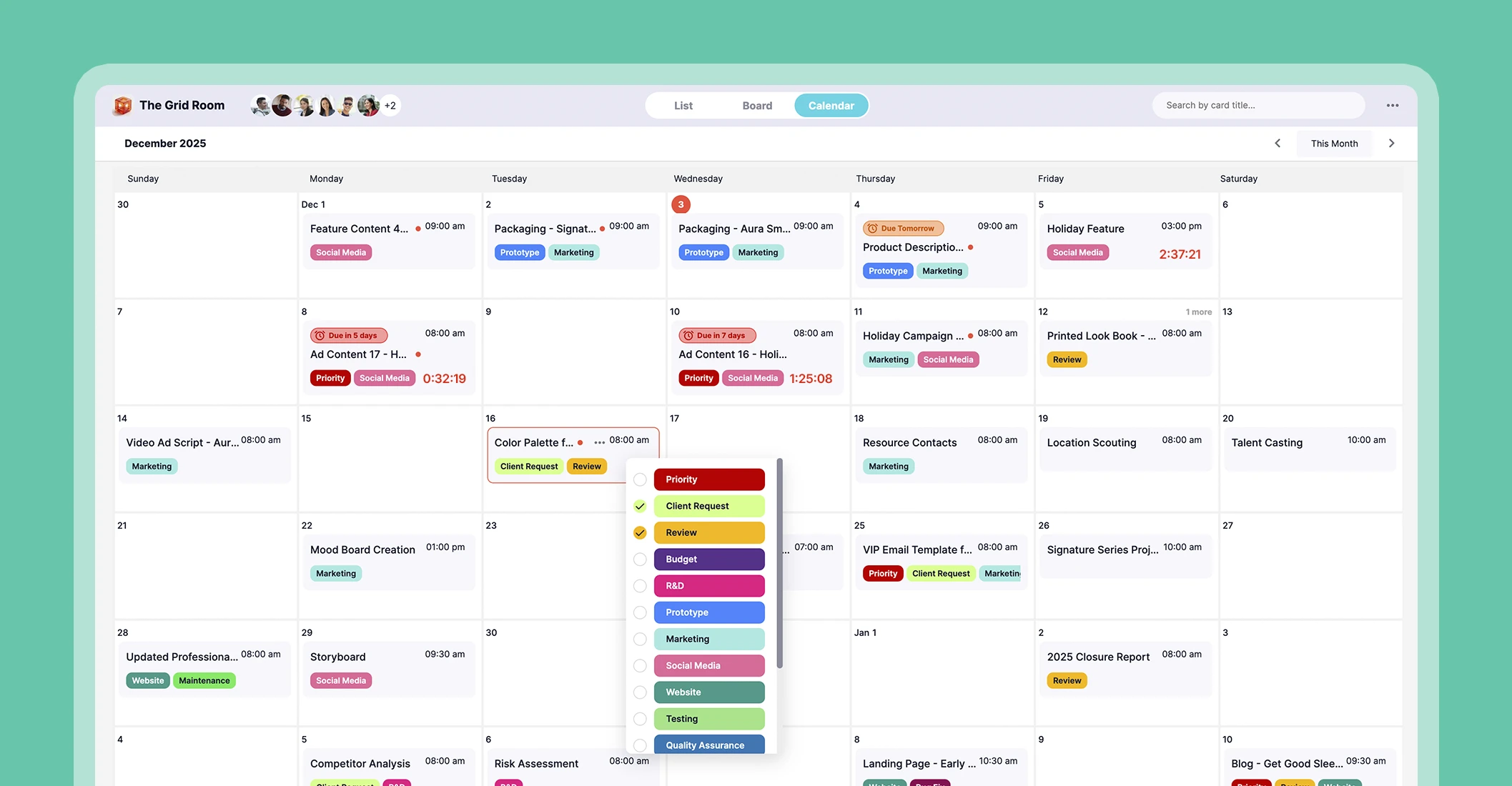
Even better, getting started is effortless. You can create an account that’s free forever. No hidden fees and trial limits. Start here.
Setting Up and Managing a Content Calendar
A content calendar is only useful if it’s actually managed. Simply filling in dates and leaving it listed won’t keep your content on track. To make it work, you need a system that reflects your workflow. Here’s how to set it up:
1. Organize by stages.
Common stages include idea, draft, review, and publish. This helps you see progress visually.
2. Add every content piece.
Treat each piece of content as a task. Include the topic, format, target audience, due date, and who’s responsible.
3. Decide on your timeframe.
Choose a planning rhythm that fits your content. Daily or weekly views work best for social media, while monthly or quarterly planning is better for blogs, newsletters, or campaigns.
4. Keep it simple.
Use colors, labels, or categories to quickly understand tasks’ context without fully opening them each.
5. Update regularly.
Move tasks along the workflow, adjust deadlines, and record notes or feedback. A calendar only works if it reflects what’s actually happening.
By following these steps, your content calendar becomes a living system. It’ll help your team focus on creating high-quality work.
Conclusion
A well-managed content calendar is a roadmap for your entire marketing strategy. Using a project management tool enhances this process. It’s easier to centralize content, visualize your schedule, and ensure accountability across your team. You’ll also get real-time notifications you can check whenever, wherever.
Start with something that’s free, forever. Create an Upprovall account today!