Easiest Project Management Tool for Beginners
Alyssa Briones
06 January 2026 01:55 AM


Learn how a simple, beginner-friendly project management tool can streamline your workflow. It covers the essential features you need, a clear starter guide to set up your first project, and tips for expanding the same system for more complex use.
Easiest Project Management Tool for Beginners
If you’re new to project management, getting started can feel like staring at a blank canvas. The sheer number of tools, features, and options looks intimidating. But the thing is, you don’t have to learn every complex function from the start.
A beginner-friendly platform changes the game. Upprovall helps you accomplish your projects effortlessly. Designed with simplicity in mind, you can start your first project immediately and grow into more advanced workflows as your confidence builds.
Essential Features for Beginners
Simplicity makes all the difference when you’re learning project management for the first time. Beginners often abandon tools that feel overwhelming, cluttered, or unintuitive. A minimalist platform can help you focus on completing work rather than figuring out the software.
- Task Lists
The first feature every beginner-friendly tool needs is clear task lists. You should be able to create tasks quickly, arrange them in the right order, and update them without hunting through menus. Alongside this, visual project boards like Kanban-style or Calendar let you see progress at a glance, so you always know where your projects stand.
- Subtasks Under Parent Tasks
These are checklists within a task to help you organize important details that have to be included.
- Real-Time Notifications
You need light and unobtrusive reminders. Missed deadlines usually come from forgetting, not from poor planning.
- Basic Collaboration Tools
Even if you’re working alone or with a small team, you should have the ability to assign tasks, leave comments, or share updates. This will keep everyone aligned.
- Progress Indicators
Simple visual cues like status labels help track your progress instantly. This is an easy way to group tasks by type, urgency, or category.
- Search and Filter Tools
Quickly find tasks or project items without scrolling too long.
- Guest Access or Limited Sharing
Allowing clients or collaborators to view certain tasks without giving full control is helpful for freelancers.
Upprovall brings all of these features together in a streamlined, intuitive interface, so beginners can focus on completing tasks instead of learning complicated systems. Everything works the way you expect, each feature is easy to find, and nothing looks messy. Learn more here.
Quick Start Guide for Your First Project
Your first project is your chance to understand how a good tool can simplify your workflow. To get started, open your workspace and give it a name that clearly reflects what you’re working on.
In Upprovall, the easiest way to stay organized is by using workspace stages. These stages act as your workflow steps; it might be simple, like "To Do,” “In Progress,” or “Ready for Review.” Or, you could set more detailed phases depending on your project’s needs.
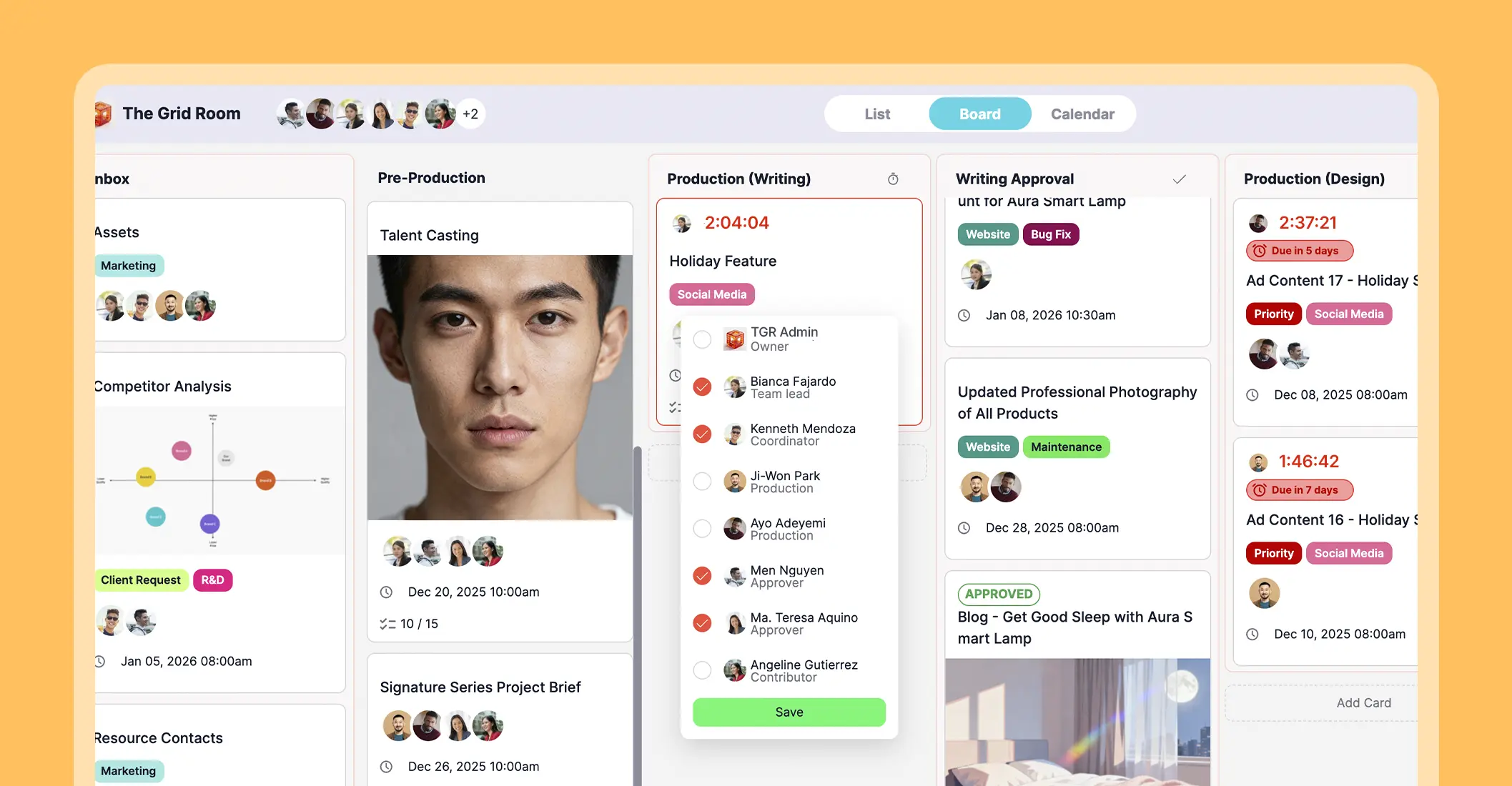
Each task appears as a card, which you can drag and drop into the stage that represents its current status. Inside every card, you’ll find subtasks, start dates and times, labels, assigned people, and a communication thread, keeping every detail connected.
This simple layout lets beginners follow all these steps in minutes, making it easier to see what’s done, what’s active, and what comes next. Your first project feels achievable and the next one even easier.
You don’t have to worry about storage. Because aside from your account being free forever, you also have access to unlimited stages and cards! Start here.

Tips for Beginners
- Stick to one project until you understand your rhythm.
- Keep task descriptions short.
- Always be reminded of important deadlines.
- Review your dashboards daily.
Scaling Your Workflow Gradually
As your projects expand or you bring more people onboard, your workflow can evolve at a comfortable pace rather than all at once. The most important thing is you’ve finally mastered the basics. The next step is discovering which tools, views, and routines genuinely help you work faster and think more clearly.
The easiest way to scale is to add new projects gradually. Use labels to keep tasks sorted across different areas. This could also serve as priority tiers that reflect how you naturally evaluate tasks. This gives you a stable framework for decision-making, so you no longer think about what to do when things get busy.
Start exploring ways to standardize processes you repeat often. Create simple routines, recurring check-ins, or internal checkpoints to assess what’s working and what needs improvement. Upprovall makes this easier by letting you reuse structures and quickly duplicate setups so you aren’t rebuilding it every time.
You can also start shaping long-term project rhythms, such as predictable start dates, expected turnaround times, or recurring checkpoints. Our card-level conversation threads can help by keeping discussions contextual so decisions don’t scatter across chats and emails.
Growth becomes far less stressful when your tool supports your pace. It must evolve your small habits into systems that carry you confidently into larger, more demanding projects.
Conclusion
The transition from beginner to confident project manager can happen seamlessly as long as supported with the appropriate platform. You don’t need to master everything at once. All you need is a simple structure that helps you start quickly, and flexible workflow options that gives you the space to expand whenever you’re ready.
Upprovall is a steady partner in your day-to-day work. No complexity, no steep learning curve, just a clear path to getting more done with less stress.
Create your account here.